Spectators
Check out the interactive live version here.
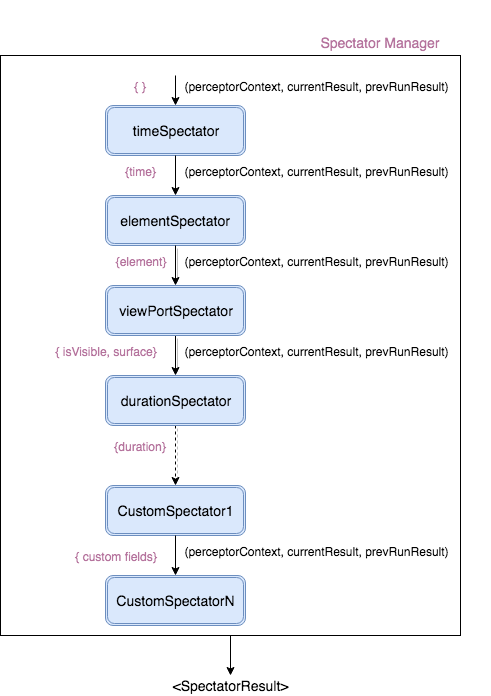
Execution Functioning
Spectators are pure or state-aware functions executed sequentially in a pipeline during each observation tick. Each spectator mutates or adds properties to the currentResult object.
Each spectator function receives three arguments:
type SpectatorFunction = (
  perceptor: PerceptorInstance,
  currentResult: SpectatorResult,
  previousRunResult: SpectatorResult | null
) => void;
Default Spectators
Perceptible executes four core spectators automatically on every tick:
1. timeSpectator
- Output Key:
time: number - Record system epoch timestamp (in milliseconds) when the tick was initiated.
2. elementSpectator
- Output Key:
element: { id: string, tagName: string } - Captures element identity metadata for telemetry tracking.
3. viewPortSpectator
- Output Key:
subView: { left: number, right: number, top: number, bottom: number, surface: number },isVisible: boolean - Measures bounding rect intersection against viewport edges (applying configured
viewOffsetoffsets) and computes surface coverage percentage.
4. durationSpectator
- Output Key:
duration: number - Accumulates total active visible duration (in milliseconds) across consecutive visible ticks.
Combined SpectatorResult Example
{
  "time": 1563705784762,
  "element": {
    "id": "testdiv",
    "tagName": "DIV"
  },
  "isVisible": true,
  "subView": {
    "left": 108,
    "right": 448,
    "top": 108,
    "bottom": 398,
    "surface": 100
  },
  "duration": 30000
}
Writing Custom Spectators
You can inject custom logic into the spectator pipeline via the spectators configuration array. Custom spectators run after default spectators, giving you full control to modify properties (e.g. overriding isVisible when Picture-in-Picture mode or fixed floating widgets are enabled).
Custom Spectator Tutorial: Floating Video Element Override
Suppose an element contains a sub-container .float (similar to YouTube's mini-player). Even if the main container scrolls out of viewport view, floating elements remain visible to the user:
// Define custom spectator function
function floatingPlayerSpectator(perceptor, currentResult, previousRunResult) {
  var container = document.getElementById('testcontainer');

  // Override visibility evaluation if floating class is present on DOM
  if (container && container.classList.contains('float')) {
    currentResult.isVisible = true;
    currentResult.isFloatingMode = true;
  }
}

// Register spectator in Perceptor constructor
var observer = new Perceptor(document.querySelector('#testdiv'), {
  spectators: [floatingPlayerSpectator],
});

observer.watch();