Overall Architecture
Live Demo
Check out the interactive live version here.
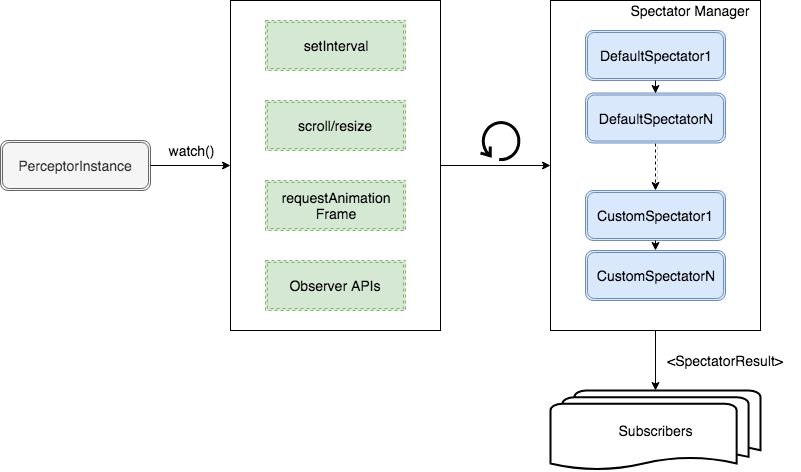
System Data Flow Pipeline
The Architecture of Perceptible is modular, separating timing execution (Scheduler), measurement (Spectators), and outcome consumption (Subscribers):
+------------------+     triggers     +-------------------+
| PerceptorInstance| ----------------> |     Scheduler     |
+------------------+                  +-------------------+
        |                                       |
        | holds config & DOM                    | tick / event
        v                                       v
+------------------+                  +-------------------+
| SubscriberChain  | <--------------- |  SpectatorManager |
| (UI / Analytics) |   SpectatorResult|  (Executes Chain) |
+------------------+                  +-------------------+
PerceptorInstance: Binds configuration options to a single target DOM element and initiates or cancels observation.Scheduler: Controls calculation timing (e.g. 500ms intervals, scroll events, orrequestAnimationFrame). Pauses when tab visibility or window focus is lost.SpectatorManager: Executes ordered spectator functions (timeSpectator,elementSpectator, custom spectators). Each spectator receives(context, currentResult, previousRunResult)and appends metric calculations tocurrentResult.SubscriberManager: Dispatches the finalSpectatorResultobject to registered subscriber callbacks (e.g. updating the DOM overlay, emitting web analytics events, or triggering lazy loading).
Lifecycle API Methods
watch()
Activates the Scheduler timer/event loop. Begins measuring element visibility rects on every cycle tick.
unwatch()
Cancels all active timers/event listeners associated with the instance. Call this method when the element is destroyed or unmounted to prevent memory leaks.
SpectatorResult Payload Specification
Subscribers receive a structured SpectatorResult object generated by the SpectatorChain during each cycle tick:
interface SpectatorResult {
  // Timestamp tick generated by timeSpectator
  time: number;

  // Measurement properties generated by elementSpectator
  element: {
    height: number;
    width: number;
    top: number;
    left: number;
    right: number;
    bottom: number;
  };

  // Surface viewability percentage (0 to 100)
  surface: number;

  // Boolean evaluation against configured threshold
  isVisible: boolean;

  // Custom spectator properties...
  [key: string]: any;
}
Architecture Components
- Schedulers: Details on timing engines and attention mode.
- Spectators: Deep dive into default and custom calculation functions.
- Subscribers: Learn how to write custom subscribers and connect analytics pipelines.